Broadband and Mobile Name Changes: Key Steps
Changing your name with broadband and mobile providers is straightforward but requires proper documentation. Without updating your records, you risk billing errors, credit check issues, or losing discounts on bundled services. Here's what you need to know:
- Documents Required: A deed poll, marriage certificate, or decree absolute (for post-divorce changes) is typically needed. Some providers may request certified copies.
- Provider-Specific Processes:
- Deed Poll Services: Services like Name Change offer deed polls starting at £16.95, including certified copies and tracked delivery.
Act early, keep documents organised, and follow up with providers to ensure the process goes smoothly. Always confirm updates to avoid disruptions.
Documents You Need for Name Changes
Before updating your name with service providers, it's crucial to have the correct legal documents ready.
Required Documents for Name Change Requests
To update your name with broadband or mobile providers, you'll need formal proof of the change. Commonly accepted documents include a deed poll, marriage certificate, or civil partnership certificate.
Each provider may have slightly different requirements. For instance, EE asks for a copy of the certificate that confirms your name change. Meanwhile, Vodafone allows you to begin the process through an online form and aims to complete the update within 24 hours.
Some providers accept digital copies, such as photos or PDFs, while others may ask for certified copies for identity or financial verification purposes. Certified copies are a secure option, especially when sending documents by post, as they protect the original.
If you’re reverting to your maiden name after a divorce, you’ll usually need both your marriage certificate and your decree absolute or final order. Marriage and civil partnership certificates are accepted by all providers across the board.
Once you’ve gathered the necessary documents, you may also need a valid deed poll to complete the process.
Getting a Deed Poll from Name Change
Name Change offers two simple options for creating a legally valid deed poll. The Printed & Posted service is priced at £16.95 and includes three certified copies, an ink stamp, a board-backed envelope for safe delivery, a guide, and PDF archiving. The Premium plan, available for £24.95, upgrades the ink stamp to a gold embossed version while maintaining all the other features.
Both services are guaranteed to be accepted by UK government departments and private institutions, including broadband and mobile providers. According to the UK Deed Poll Office:
We guarantee that our deed polls will be accepted at all government and private institutions as evidence of your new name. Otherwise, you get your money back, 100% guaranteed!
Applications submitted before 3 PM on working days are usually processed the same day and dispatched within two working days. The service includes tracked delivery and unlimited PDF downloads, ensuring you always have access to your documents. Remember, your deed poll must be signed by two independent witnesses who are UK residents, over the age of 18, and not related to you.
sbb-itb-bf1bef6
How to Update Your Name with Broadband Providers
Once you've sorted out your deed poll or other legal documents, it's time to notify your broadband provider about your name change. Each provider has its own process, so here's a quick guide for BT, Vodafone, and EE.
BT Broadband Name Change
For BT, log into your My BT account and submit a name change request. You'll need to upload a clear digital copy of your deed poll, marriage certificate, or other proof of name change through their online portal. BT typically processes these requests within standard business days. Once your name has been updated, you'll receive a confirmation. Make sure your uploaded documents are legible and free from any glare or obstructions.
Vodafone Broadband Name Change
Vodafone simplifies the process with an online form dedicated to name and title changes. You can find this form on their website and submit your deed poll or certificate directly through it. Vodafone aims to complete updates within 24 hours:
After you've submitted your form, we'll aim to make the change within 24 hours.
This makes Vodafone the quickest among the major UK providers. Once the update is done, you'll receive an email confirmation.
EE Broadband Name Change
EE gives you three ways to update your name: email, post, or visiting an EE store in person. You'll need to provide a copy of your marriage certificate, deed poll, or decree absolute, along with your current name, home address, and either your landline or account number. If you're using a passport as proof, include a recent utility bill as well.
For those with bundled broadband and mobile accounts that receive a discount, you'll need to update both accounts to keep your discounted rate. Changes made in-store are processed immediately, but email and postal submissions take longer to verify.
How to Update Your Name with Mobile Providers
Updating your name on your mobile account is a straightforward process, much like changing it for broadband services. Each provider has its own procedures, but the overall approach is similar. The good news? This is purely an administrative task - it won’t affect your mobile service. Below, you’ll find the specific steps for some of the main providers.
Vodafone Mobile Name Change
Vodafone simplifies the process by using the same online form for both mobile and broadband accounts. To update your name, head to their website and complete the "Change your name or title" form. You’ll need to upload proof of your name change, such as a deed poll or other official document.
"After you've submitted your form, we'll aim to make the change within 24 hours. You'll get a confirmation email, and if we need any more information we'll be in touch."
If you don’t see a confirmation email after 24 hours, check your spam folder or contact Vodafone directly. Additionally, Vodafone offers a "Living as me" service, which provides 24 months of billing history. If you don’t receive this within 10 days, you can email them at [email protected].
BT Mobile Name Change
For BT Mobile customers, the name change process is handled through the My BT app or your online account. Simply upload your valid name change document - such as a deed poll or marriage certificate - via the app or website. Updates are processed during standard business hours, and you’ll receive confirmation once the change is complete. Importantly, your mobile services will remain unaffected during this process.
EE Mobile Name Change
EE offers several ways to update your name, giving you the option to submit documents via email, post, or by visiting a store. Accepted documents include a marriage or civil partnership certificate, deed poll, decree absolute, or a passport along with a recent utility bill. For email submissions, make sure your documents are photographed clearly in natural light on a flat surface.
If you choose to mail your documents, send them to:
Customer Administration
6 Camberwell Way
Doxford Technology Park
Doxford, Sunderland
SR3 3XN
For the quickest results, visit an EE store where an EE Guide can process the change immediately. Email and postal submissions typically take between 1 and 24 hours to reflect in the system.
Additionally, EE lets you update your "preferred name" for emails through their app or website without requiring documentation. However, this won’t affect the legal name on your account or billing statements.
Provider Comparison: Timelines, Methods, and Common Problems
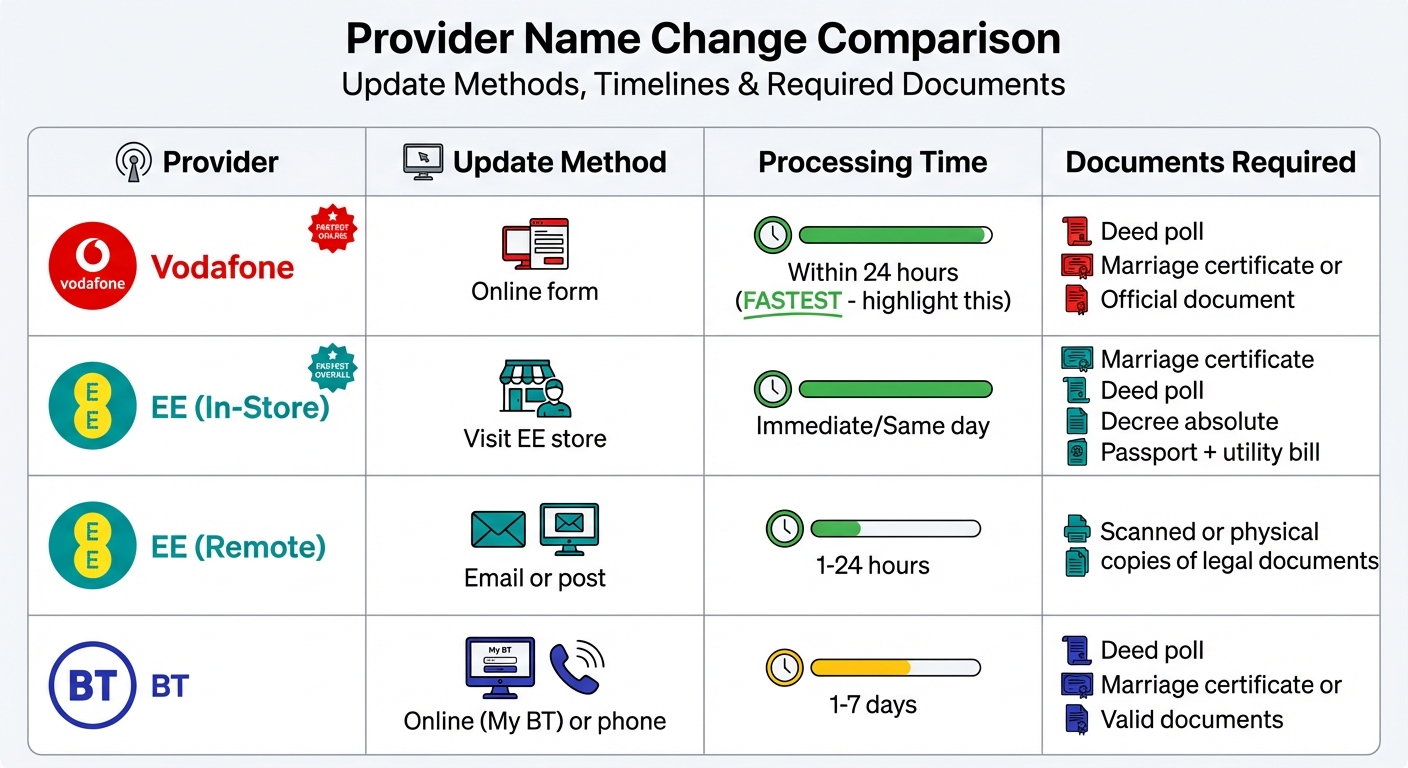
UK Broadband and Mobile Provider Name Change Comparison: Timelines and Methods
Now that we've outlined the specific procedures for each provider, here's a side-by-side comparison to help you determine which approach works best for your situation.
Comparison Table of Broadband and Mobile Providers
Each provider has its own process for updating account details. Below is a summary of the key differences:
| Provider | Update Method | Timeline | Proof Required |
|---|---|---|---|
| Vodafone | Online form | Within 24 hours | Deed poll, marriage certificate, or other official document |
| EE | In-store | Immediate/same-day | Marriage certificate, deed poll, decree absolute, passport, plus utility bill |
| EE | Email or post | 1–24 hours | Scanned or physical copies of legal documents |
| BT | Online or by phone | 1–7 days | Deed poll, marriage certificate, or other valid documents |
While these processes are fairly straightforward, there are a few common issues you might face. Here's how to address them quickly.
Common Problems and How to Fix Them
- Blurry or rejected documents: If your documents are unclear, they may be rejected. To avoid this, ensure they're placed on a flat surface in good natural light. Hold your phone parallel to the document to minimise shadows and ensure the image is sharp.
- Loss of bundled discounts: If you have bundled services (like broadband and mobile), make sure both accounts are updated at the same time. Contact your provider in advance to confirm how changes might affect your discounts.
- Account transfer restrictions: When transferring an account to someone else, EE requires the account to have been active for at least three months, with no outstanding balance. The new holder will also need to pass a credit check and provide a debit or credit card.
- Deed poll requirements: Some providers may only accept enrolled deed polls - those officially recorded through the High Court, which costs £53.05. Check with your provider to confirm which type of deed poll they accept before proceeding.
Tips for a Smooth Name Change
Notify Providers Early
Once your documents are ready, start notifying your service providers. Most providers update their records within 1–7 days, with some, like Vodafone, processing changes within just 24 hours. Acting early helps prevent billing issues and ensures that your contract details, device financing agreements, and credit check records reflect your updated name. To streamline the process, have key details like your current name, home address, and account number handy for verification. After notifying your provider, make sure to keep clear and easily accessible records of your submitted documents.
Keep Your Documents Organised
After notifying your providers, it’s important to keep your legal documents well-organised. Maintain several certified copies and digital scans of your documents for convenience. A list of account details can also be helpful for quick reference. Many broadband and mobile providers accept high-quality digital scans submitted via email or online forms. However, some may still require physical copies with "wet-ink" signatures. Ensuring that your account numbers and the exact name on each contract are aligned will help providers locate and update your profile more efficiently.
Confirm and Follow Up
Always request a confirmation email after submitting your name change request. If you don’t receive one within the expected timeframe - 24 hours for Vodafone or up to 7 days for other providers - check your account status, spam folder, or reach out to customer support. Delays might happen if your documents are unclear or if a credit review is triggered. To avoid issues, double-check that the name on your legal documents matches the name on your request exactly.
Wrapping It Up
Changing your name on broadband and mobile accounts is straightforward if you have the right legal documents in hand. Services like Name Change make it even easier, offering unenrolled deed polls starting at £16.95. Their package includes printed documents, three certified copies, tracked delivery, and PDF archiving - all designed to meet the acceptance criteria of UK government departments and organisations.
Being well-prepared and notifying your service providers promptly helps avoid unnecessary delays. Keep certified copies and clear digital scans handy to ensure the process moves along smoothly. With around 60,000 people in the UK legally changing their name by deed poll each year, you're in good company.
"Without a valid deed poll, many organisations will not acknowledge your name change" – UK Deed Poll Service
FAQs
Will changing my name affect my broadband or mobile service?
When you change your name legally, for example, via a deed poll, it doesn’t mean your broadband or mobile account will automatically reflect the change. You’ll need to notify your service providers yourself and provide the necessary proof of your name change. To update your account details, get in touch with your provider and follow their specific instructions.
What should I do if my provider rejects my documents?
If your documents are rejected by your provider, make sure your government-issued IDs, such as your passport or driving licence, reflect your updated name. Showing these in person can often prevent issues. If there's a delay in updating your IDs, you can submit a complete set of evidence, including your deed poll along with any supporting documents. It’s also a good idea to reach out to the provider directly to clarify their requirements or, if necessary, provide certified copies of your documents.
How do I avoid losing a bundled discount after a name change?
To maintain your bundled discount after a name change, it's essential to update your details with your broadband and mobile providers as soon as possible. Most providers will ask for proof of the name change, such as a deed poll, passport, or driving licence.
Once you've submitted the required documents, follow up with your provider to confirm that your account details, including any discounts, have been updated. This step helps ensure accurate billing and prevents the risk of losing any offers tied to your account.